Getting help — the chat widget
When the Help Center doesn't have your answer, the chat widget on every page reaches us directly. This article shows where the widget lives, what response times to expect, and how to write a support message that gets a fast useful reply.
Written By Alan Gandy
Last updated 3 months ago
The Help Center is good for "how do I…?" articles. But sometimes you have a specific failure or question that needs a human. CodeTeach has a floating chat widget on every page for exactly that.
This article shows where the widget lives, what to expect when you message us, and how to write a message that gets a fast useful reply.
Where the widget lives
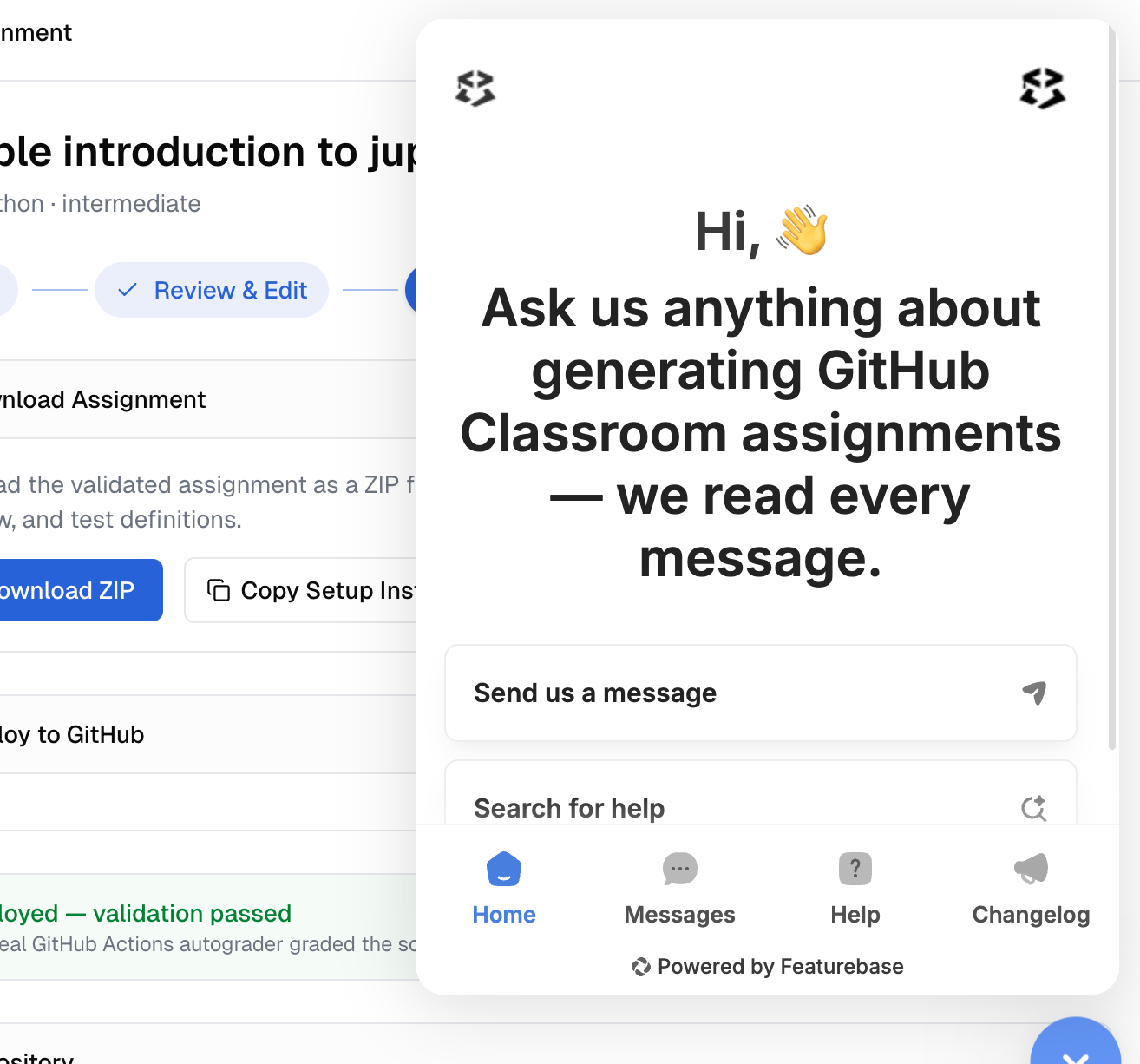
Bottom-right corner of every page in CodeTeach (and on this Help Center). Look for the chat-bubble icon. Click it to open.
If you don't see it:
- Ad blocker may be hiding it. Add
do.featurebase.appandfeaturebase.comto your blocker's allowlist for codeteach.ai. - Browser extension interfering. Try in an incognito window — if the widget appears there, an extension is the cause.
- Featurebase is having an outage. Rare. Check status.featurebase.app.
What you can do in the widget
When you click the icon, the widget opens with four tabs at the bottom:
- Home — welcome message and a button to start a new conversation
- Messages — your past conversations with us, plus any in-progress thread
- Help — searches this Help Center inline (faster than navigating to it)
- Changelog — recent updates to CodeTeach
To message us, click Send us a message on the Home tab (or open Messages and click New conversation). Type your message, hit send.
Response times
We respond Monday–Friday, generally within one business day. We're not 24/7, and we don't have a guaranteed SLA — but in practice, most messages get a response within a few hours.
For urgent issues (e.g., you're about to teach a class and the deploy is failing), include "URGENT" in your message and we'll prioritise.
How to write a message that gets fast help
The more specific you are, the faster we can help. Save us a back-and-forth and you'll be unblocked sooner.
Almost always include:
- What you were trying to do — "I was deploying assignment ABC to org XYZ"
- What actually happened — "The deploy failed with this error: [paste]"
- What you expected to happen — "I expected the repo to be created in my org"
- The assignment title or session ID — the URL of the assignment page contains the ID after
/wizard/
For deploy / validation issues, also include:
- The status the assignment is in (
generating,validated,deployed, etc.) - Whether you can reproduce it (every time, or just once?)
- The repo URL if it's already deployed
For UI issues, also include:
- Browser + version (Chrome 130, Firefox 138, etc.)
- What you clicked just before things went weird
- A screenshot if you can — drag-and-drop into the widget works
What you don't need to include:
- Apologies for "asking a basic question." Ask anything; the help center grows from real questions.
- A long preamble about who you are. We see your account info on our end.
- Your password, API key, or any credential. We will never ask for these.
What we'll do with your message
When your message arrives in our inbox:
- We read it (within ~24 hours during business days)
- We reply directly, usually with either a fix or a follow-up question
- The reply shows up as a notification in the widget (and optionally an email if you've enabled them)
- The conversation thread persists — you can reopen it later if the issue recurs
Serious issues — broken site, can't sign in
If the site is completely down or you can't access your account:
- The chat widget might also be down. Check status.codeteach.ai for known outages.
- For account-recovery issues (lost access), email admin@codeteach.ai directly. Include the email address on your account.
- For billing emergencies (unexpected charges, refund requests), email admin@codeteach.ai.
For everything else, the widget is the best path.
Reporting a bug
Bug reports help us fix things — please report them.
Useful bug-report content:
- What you saw (the bug, with screenshot if possible)
- What you expected to see (the correct behaviour)
- Reproduction steps ("Click X, then Y, then Z, then notice that…")
- Browser + OS (Chrome 130 on macOS Sonoma, etc.)
- Frequency (always / sometimes / once)
Bug reports go into our triage queue. Confirmed bugs get fixed in priority order — usually within 1–2 weeks for non-blockers, faster for things blocking instructors mid-semester.
Suggesting a feature
We love feature suggestions. Send them via the widget — they go into our roadmap-tracker. We can't promise to build everything, but every suggestion is read and considered.
If you want to track or upvote suggestions, the widget also has a public roadmap (linked from inside the widget) where you can see what we're working on.
What we use Featurebase for
The widget, this Help Center, and our roadmap are all powered by Featurebase. They're a third-party tool we picked because it consolidates support / docs / roadmap / changelog in one place. When you message us through the widget, your messages route to a Featurebase inbox we monitor.
Privacy-wise: messages you send through the widget are stored on Featurebase's servers (US-based, GDPR-compliant). We don't sell or share your support messages. See our privacy policy for full details.
Where to go next
- Have a question now? → Click the widget bottom-right and ask. We'll get back to you.
- Want to read other articles first? → Browse the Help Center — left sidebar groups articles by collection.
- Looking for the public roadmap? → Open the widget → top-right menu → "Roadmap." Or visit
codeteach.featurebase.appdirectly.